CRM cleanup sounds harmless until the wrong duplicate merge changes ownership on a target account, breaks attribution, and routes the next hand-raiser to the wrong rep.
Dirty data is bad. Reckless cleanup is worse.
Revenue operations teams need a cleanup plan that separates safe automated fixes from exceptions that require review. The goal is not a pristine CRM for its own sake. The goal is a CRM that can safely drive routing, reporting, segmentation, lifecycle automation, and AI workflows.
Short answer
A CRM data cleanup exception handling checklist should define which duplicate records, stale fields, invalid emails, account hierarchy conflicts, enrichment mismatches, ownership conflicts, lifecycle stage drift, consent flags, and rollback risks can be fixed automatically and which require human review. RevOps should use exception queues, field-level change logs, before-and-after snapshots, approval rules, and monitoring dashboards before cleanup automation touches production records.
If you are choosing outside help, start with CRM data cleanup automation partners. If cleanup connects multiple systems, review the API integrations platform guide and API integration partner comparison.
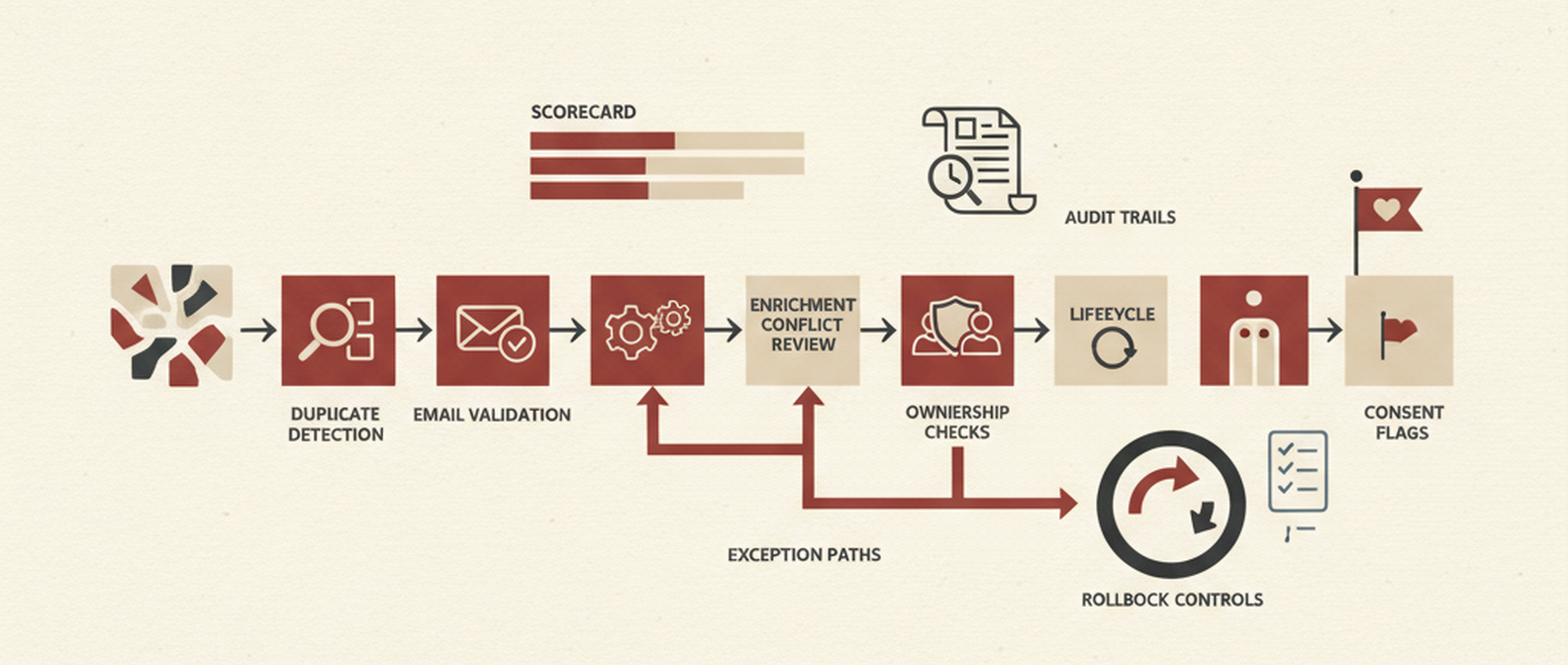
*Visual requirement: create a slug-specific hero image showing CRM records moving through dedupe, validation, enrichment, ownership, lifecycle, consent, and rollback gates. Add a supporting one-page exception triage template later at /blog/images/crm-data-cleanup-exception-handling-checklist-for-revenue-operations-teams-template.png.*
The exception handling checklist
| Exception type | Automate when | Human review when | Rollback requirement |
|---|---|---|---|
| Duplicate contacts | Same email, same CRM ID relationship, low-value record, no active opportunity | Different emails, multiple accounts, executive contacts, active deal context, conflicting owners | Preserve merge history and pre-merge field snapshot |
| Duplicate companies | Exact domain match and no conflicting parent account | Subsidiaries, regional entities, franchise models, named strategic accounts | Keep account hierarchy and owner before/after |
| Invalid emails | Syntax failure, disposable domain, hard bounce, or confirmed invalid verification | Personal email on a key buyer, recent engagement, customer contact, consent ambiguity | Log suppressed field and reason |
| Stale fields | Field is unused, older than threshold, and does not drive automation | Field drives routing, segmentation, scoring, lifecycle stage, reporting, or contracts | Export affected record IDs and old values |
| Account hierarchy conflicts | Clear parent-child mapping from trusted source | Multiple possible parents, acquired companies, territory implications | Preserve previous parent and owner |
| Enrichment mismatch | Trusted source fills missing non-sensitive fields | Enrichment overwrites customer-provided data, legal name, employee count tier, industry, or region used for routing | Store source, confidence, and previous value |
| Ownership exception | Owner inactive and account has no open opportunity | Strategic account, active opp, named account, renewal, or customer escalation | Log approver and assignment reason |
| Lifecycle stage drift | Stage can be inferred from closed system events | Conflicting opportunity, subscription, product usage, or billing state | Snapshot lifecycle field and triggering evidence |
| Consent and privacy flags | Never auto-clear without policy approval | Any unsubscribe, opt-out, regional privacy, deletion, or consent-status conflict | Preserve consent audit trail |
| Automation-triggered changes | Low-risk formatting or normalization | Any change that sends messages, changes owner, updates lifecycle, or affects attribution | Rule version and affected-record export |
This table is the operating asset. The rest of the cleanup project exists to make these decisions enforceable.
1. Start with the fields that drive business actions
Do not clean every field equally.
Prioritize fields that drive:
- lead routing;
- account ownership;
- lifecycle stage;
- territory assignment;
- segmentation;
- lead scoring;
- campaign attribution;
- renewal workflows;
- billing handoffs;
- consent and privacy compliance;
- AI or enrichment workflows.
A typo in an unused note field is annoying. A wrong lifecycle stage can trigger the wrong nurture, hide an active opportunity, or corrupt a forecast.
2. Treat duplicate merges as high-risk changes
Duplicate cleanup is the easiest place to do permanent damage.
Before merging records, define precedence rules:
- Which field wins when both records have a value?
- Does the most recent value always win?
- Which source is trusted most?
- Should sales-owned fields override marketing enrichment?
- What happens to activity history?
- What happens to list membership and campaign attribution?
- What happens to open opportunities, tickets, subscriptions, and renewal dates?
For obvious low-value duplicates, automation can propose or execute merges. For active accounts, executive buyers, open opportunities, and customers, use human review. The extra minute is cheaper than cleaning up a bad merge that touches the pipeline.
3. Build the exception queue
Your cleanup workflow needs a queue for records that are too risky for blind automation.
Each exception should include:
- record URL;
- exception type;
- current value;
- proposed value;
- source of proposed value;
- confidence score or rule name;
- downstream systems affected;
- recommended action;
- reviewer;
- approval status;
- rollback notes.
That queue can live in the CRM, a spreadsheet, Airtable, a ticketing system, or a custom admin table. The tool matters less than the discipline: nothing risky changes without evidence and ownership.
4. Monitor cleanup like production automation
After cleanup rules go live, monitor:
| Metric | Why it matters |
|---|---|
| Duplicate rate by object | Shows whether new duplicates are entering faster than cleanup can fix them |
| Invalid email rate | Protects deliverability and segmentation quality |
| Required field fill rate | Reveals whether forms, imports, and integrations provide enough data for automation |
| Exception volume | Shows where rules are ambiguous or data sources disagree |
| Manual approval backlog | Prevents cleanup from stalling in review |
| Owner changes by segment | Catches accidental territory or account assignment shifts |
| Lifecycle changes by source | Flags automation that is moving records into the wrong stage |
| Consent flag edits | Protects unsubscribe, privacy, and compliance-sensitive states |
| Rollback count | Reveals whether rules are too aggressive |
The dashboard should make one thing obvious: are we making the CRM more useful, or just more cosmetically tidy?
5. Define rollback before bulk changes
Bulk cleanup without rollback is just gambling with a nicer interface.
Before running production cleanup:
- Export affected record IDs.
- Snapshot fields being changed.
- Record the rule version.
- Save the source data or enrichment provider.
- Log the operator or automation job.
- Test on a small segment.
- Review downstream automation triggers.
- Confirm how to restore old values.
This is especially important before merges, lifecycle updates, owner changes, and consent-related edits.
Red Brick Labs POV
CRM cleanup is not a hygiene project. It is automation readiness work.
If the CRM drives routing, reporting, enrichment, lifecycle campaigns, customer handoffs, or AI agents, then bad data becomes bad automation. But cleanup rules can also create new damage if they are too aggressive.
Red Brick Labs would start with a cleanup risk map: identify fields that trigger business actions, classify fix types by risk, build the exception queue, run a limited cleanup on one segment, and monitor the downstream effects before scaling.
CTA: clean the CRM without breaking the business
If your CRM cleanup plan is "dedupe everything and hope reporting improves," stop. That is how teams create cleaner-looking chaos.
Book a 15-minute consultation and Red Brick Labs can help you define safe cleanup rules, exception handling, and rollback before automation touches production data.
Pressure-test your CRM cleanup plan: Red Brick Labs helps revenue operations teams audit CRM data quality, define cleanup rules, build exception queues, monitor risk, and automate the fixes that are safe enough for production.
Source notes
- HubSpot's data quality tools show the native CRM categories teams should monitor: duplicates, formatting, enrichment, and property insights.
- HubSpot community guidance reinforces the need to identify critical fields, affected stakeholders, current field quality, and ongoing cleanup process before changing records.
- Insycle, Clearout, Prospeo, and Default sources are useful for common CRM cleanup categories: dedupe, verification, enrichment, stale fields, and automation.
- This article is intentionally about exception handling, because RevOps cleanup risk lives in the edge cases, not the obvious typos.