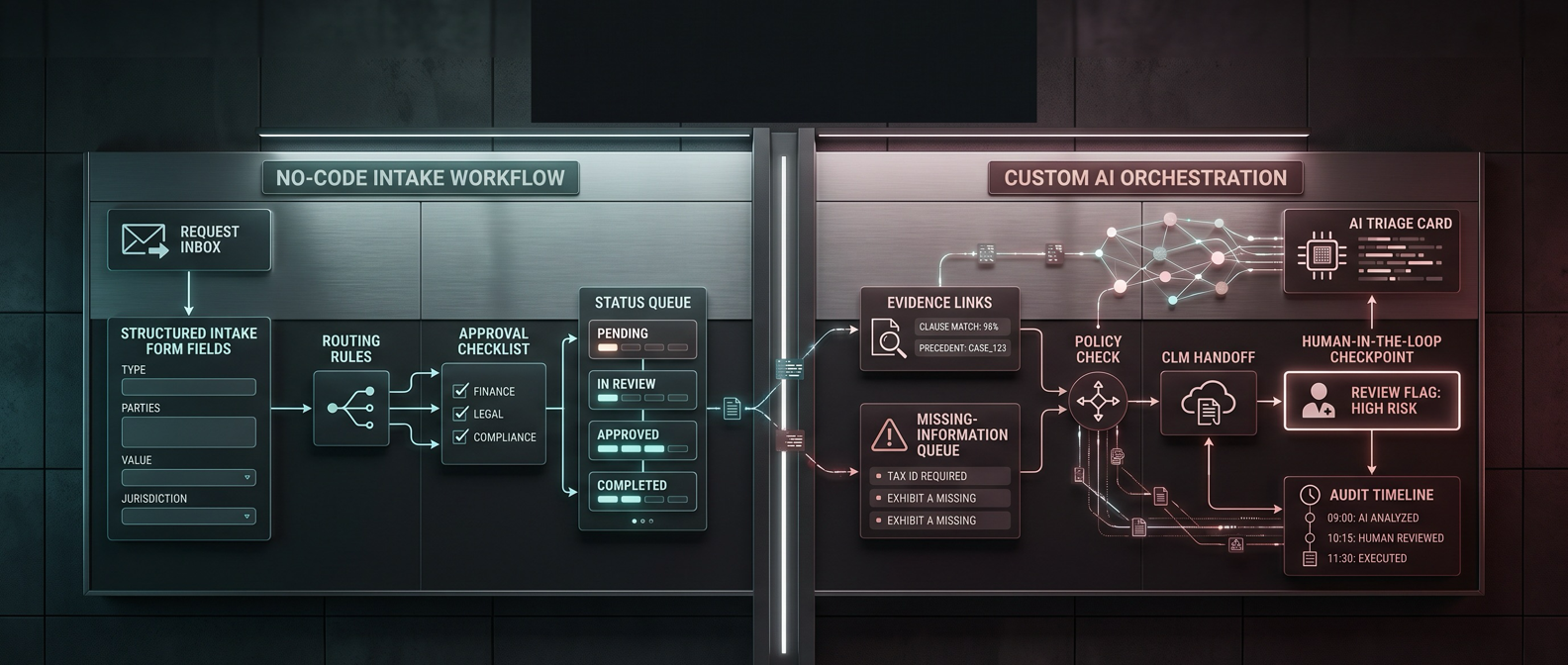
Contract intake automation usually gets sold as a form problem.
It is not.
The form is just the front door. The real system decides what information legal needs, where the request should go, which approvals must happen before review, what AI is allowed to infer, and where the contract record lives after intake.
That is why the no-code vs custom AI automation contract intake decision matters. Legal ops teams do not need a philosophical debate about builders versus engineers. They need to know when a no-code workflow is enough, when a CLM-native intake path is better, and when the intake process has become important enough to treat like production software.
Short answer
Use no-code automation for contract intake when the workflow is mostly structured request capture, routing, reminders, simple approvals, and status tracking. That covers plenty of legal operations work: sales contract requests, vendor agreements, NDAs, procurement review, and internal legal service requests with stable rules.
Use custom AI automation when intake stops being a routing problem and becomes a judgment-and-controls problem. That usually means third-party paper, messy email threads, missing business context, CRM or procurement dependencies, policy-aware triage, AI-generated evidence summaries, long-running review states, and guarded handoffs into a CLM or business system.
For most teams, the sane answer is phased:
- Start with a workflow readiness lens from the Accounts Payable Automation Readiness Scorecard.
- Borrow document-processing discipline from Accounts Payable OCR Software.
- Compare legal intake platforms in Best Contract Intake Automation Tools for Legal Operations Teams.
- Use Best Contract Management Software only after the intake model is clear.
The practical decision table
Use this table before you buy a platform or ask an AI agent to "handle contract intake."
| Decision factor | No-code is usually enough when... | Custom AI is usually worth it when... |
|---|---|---|
| Request channels | Requests can be forced into a form, portal, CRM action, Slack workflow, or CLM launch form | Requests arrive through email, Slack, CRM, vendor portals, attachments, and forwarded context that cannot be normalized cleanly upfront |
| Intake fields | Contract type, counterparty, value, deadline, requester, and document link are enough to route the work | The system must infer missing fields from documents, messages, CRM records, purchase context, or prior history |
| Routing | Request type, value, department, region, and template used drive most paths | Routing depends on legal risk, clause content, business context, negotiation posture, or policy interpretation |
| Approvals | Business, finance, procurement, security, and legal approvals follow stable rules | Approval needs vary by counterparty, paper type, clause deviations, data access, spend, revenue impact, or strategic risk |
| AI use | AI suggests tags, summaries, or request categories with human review | AI must build an evidence packet, compare documents to policy, recommend triage, and explain why |
| Human review | Humans approve or reject using a clear request record | Humans need source-linked recommendations, exception rationale, and confidence flags before acting |
| CLM handoff | The workflow creates a request, updates a status, or routes to the right workspace | The workflow needs guarded writes, staged CLM actions, CRM sync, rollback discipline, and stronger permissions |
| Auditability | Platform logs and request status history are enough | Legal needs replayable decisions, evidence links, prompt/model logs, approval reasons, and exception history |
| Ownership | Legal ops can maintain the rules in a visual builder | The workflow needs engineering discipline, tests, monitoring, access controls, and an accountable technical owner |
| Best first move | Build a clean intake form and routing workflow | Design the intake-state model and control architecture before building |
What no-code does well for contract intake
No-code is not a toy category anymore.
Airtable forms and automations can run a lightweight legal intake database. Slack Workflow Builder can capture requests where business users already work. Power Automate approvals can support sequential approval patterns. CLM platforms and legal intake tools such as Ironclad, SpotDraft, Checkbox, and Juro now expose increasingly structured intake, routing, and approval surfaces.
For contract intake, no-code usually works well when you need to:
- capture requests through a form, Slack workflow, CRM button, or CLM launch form;
- require the fields legal actually needs before review starts;
- route by contract type, value, business unit, region, template, or urgency;
- send reminders and escalations;
- create approval steps for finance, procurement, security, privacy, or business owners;
- update a legal request queue;
- send a clean handoff to CLM, e-signature, repository, CRM, or ticketing;
- report on request volume, cycle time, overdue work, and bottlenecks.
That is already a big upgrade over the normal mess: "Can legal look at this?" plus a PDF, no value, no deadline, no owner, and a thread that disappears after the deal closes.
A strong no-code contract intake pattern
| Layer | Good no-code version |
|---|---|
| Front door | Airtable form, Slack workflow, CRM action, CLM launch form, or legal intake portal |
| Required context | Contract type, counterparty, value, business purpose, template/paper type, deadline, owner, risk flags |
| Validation | Missing-field checks, document-link checks, requester follow-up, low-risk self-serve rules |
| Routing | Table-driven logic by request type, department, value, region, paper type, or risk flag |
| Approval | Human approve/reject/needs-info steps for business, finance, procurement, security, privacy, or legal |
| Queue | Legal triage view with owner, SLA, blocker, next action, and status |
| Handoff | Create CLM request, update CRM/procurement record, or move to legal review queue |
| Audit | Record requester, approver, timestamp, decision, status changes, and notes |
If this architecture solves the problem, custom AI is premature.
Where no-code starts to crack
No-code usually fails quietly before it fails dramatically.
At first, the workflow looks fine. Requests are coming in. Slack notifications are firing. The legal queue is visible. Someone builds three more branches for edge cases. Then ten. Then the workflow becomes a canvas only one person understands.
The real problem is not the tool. It is that contract intake has crossed into software territory.
No-code starts to struggle when:
- the request record depends on reading messy third-party paper;
- the business context lives across CRM, procurement, finance, email, and shared drives;
- requesters often submit incomplete or misleading information;
- legal triage depends on clause content, policy exceptions, or negotiation history;
- approvals change based on several conditions at once;
- a request can loop through missing information, business approval, legal review, redlines, finance review, and resubmission;
- AI output needs confidence thresholds, source links, and human review gates;
- the workflow needs guarded write actions into CLM, CRM, procurement, or repository systems;
- legal ops cannot answer "what happened to this request and why?" without manually reconstructing the trail.
That is the shift. The workflow is no longer "collect request and route." It is "interpret a contract situation, assemble evidence, recommend the right path, and keep legal in control."
When custom AI is justified
Anthropic's guidance on effective agents draws a useful line between workflows with predefined paths and agentic systems that use models and tools more flexibly. Contract intake does not need full agentic flexibility by default. Most intake work should be boring.
Custom AI becomes justified when the system must:
- read third-party contracts, emails, attachments, and intake notes together;
- extract relevant contract metadata from inconsistent documents;
- compare contract facts against playbooks, policies, CRM fields, procurement data, or approval rules;
- classify request type, risk, and routing path with a human-readable rationale;
- generate an evidence packet for legal triage;
- pause before any risky action using guardrails and human approval;
- persist state across intake, missing-info loops, legal review, redlines, approvals, and handoff;
- log model inputs, outputs, decisions, and exceptions;
- support evaluation, replay, monitoring, and rollback;
- align with risk-management expectations such as the NIST AI Risk Management Framework.
This is not a reason to custom-build everything. It is a reason to stop pretending a sprawling visual workflow is still the right tool once the intake path needs evidence, reasoning, and controls.
A strong custom AI contract intake pattern
| Layer | Good custom AI version |
|---|---|
| Intake record | Structured request object plus contract file, email context, CRM/procurement references, and requester metadata |
| Retrieval | Pulls relevant account, opportunity, vendor, purchase, policy, template, playbook, and prior-contract context |
| AI triage | Extracts fields, flags missing information, classifies risk, and proposes route with sources |
| Guardrails | Blocks unsafe actions, limits tools, enforces confidence thresholds, and requires human approval for legal-risk steps |
| Human review | Legal sees the recommendation, evidence, missing fields, risk flags, and proposed next action |
| State | Workflow survives resubmission, redline cycles, approvals, owner changes, and downstream CLM feedback |
| Observability | Logs decisions, model outputs, approvals, exceptions, latency, failure modes, and replayable cases |
| Handoff | Creates or updates CLM/CRM/procurement records only through controlled action gates |
That is a production system. Build it only when the value and risk justify the discipline.
Three common contract intake scenarios
1. Standard commercial contract request
A sales rep needs legal review for an order form, MSA, NDA, or amendment. The request starts in Salesforce or a legal intake form. Required fields include counterparty, value, close date, template used, non-standard terms, and business owner.
Use no-code or CLM-native intake.
This is a structured request problem. The highest-leverage work is:
- clear request types;
- required fields;
- CRM or CLM initiation;
- approval rules;
- legal queue visibility;
- requester status updates.
Custom AI might help summarize context later, but it should not be the core intake architecture yet.
2. Procurement or vendor paper intake
A business owner submits a vendor agreement, security addendum, DPA, order form, or third-party paper. The request needs finance, procurement, security, privacy, and legal triage before review can move.
Use a hybrid model.
No-code can handle the front door, routing, reminders, and approval collection. Custom AI can help with the messy parts:
- extracting key fields from vendor paper;
- flagging missing business context;
- identifying clauses that trigger privacy or security review;
- preparing an evidence packet for legal;
- recommending the next route without making the final decision.
This is where legal ops should be careful. Do not let AI become the approver. Make it the intake analyst, evidence assembler, and exception router.
3. High-volume legal front door
Legal receives contract requests plus marketing reviews, compliance questions, policy exceptions, employment matters, procurement escalations, and random business requests through Slack, email, Teams, Jira, CRM, and forms.
Start with legal intake software or a custom AI intake layer, depending on complexity.
Tools like Checkbox are designed for broader legal intake and triage. But if the organization has unusual systems, private context, custom policies, or a strong need to classify and route messy requests without forcing every user into a portal, custom AI may become the better control layer.
The important distinction: the system should make legal's queue cleaner, not hide ambiguous decisions behind a black box.
The scoring shortcut
Score each category from 1 to 5 before you choose the build path.
| Category | 1 point | 3 points | 5 points |
|---|---|---|---|
| Request consistency | Requests are structured and complete | Some fields are missing or inconsistent | Requests are vague, multi-channel, and document-heavy |
| Routing complexity | One or two simple paths | Several branches by value, team, or contract type | Routing depends on policy, clauses, context, and exceptions |
| Data complexity | One form and one document link | Contract plus CRM/procurement fields | Contract packet plus email, CRM, vendor, policy, and prior-history context |
| Approval depth | One clear business or legal approval | Multiple functional approvals | Conditional, parallel, or exception-heavy approvals |
| AI judgment | None or simple summarization | Classification or missing-field detection | Evidence-based recommendation and policy-aware triage |
| Control risk | Low-risk status updates | Review gates before handoff | CLM, CRM, procurement, or repository writes with legal-risk implications |
| State needs | One intake-to-review handoff | Missing-info and approval loops | Long-running request state across review, redlines, resubmission, and handoff |
| Ownership needs | Legal ops can maintain it | Shared legal ops and technical ownership | Needs tests, monitoring, permissions, evals, and technical owner |
Score interpretation
| Total | Recommendation |
|---|---|
| 8-16 | Use no-code or CLM-native intake. |
| 17-24 | Use no-code first, but document limits and escalation paths. |
| 25-32 | Use a hybrid architecture: no-code front door, custom AI for triage and exceptions. |
| 33-40 | Design a custom AI contract intake system. |
What to ask before choosing the build path
Do not start with "Should we use Zapier, Power Automate, Ironclad, SpotDraft, Checkbox, or a custom agent?"
Start with these questions:
| Question | Why it matters |
|---|---|
| What are the actual request types? | Intake fields and routing should change by request type, not by whoever yells loudest |
| Which fields block legal review if missing? | Required fields should prevent wasted legal cycles |
| Which requests can be self-serve? | Low-risk templates should not create legal queue noise |
| Which approvals are legal controls? | Business, finance, procurement, privacy, and security approvals are not interchangeable |
| What systems hold the truth? | CRM, CLM, procurement, finance, repository, and Slack each play different roles |
| What should AI never decide alone? | Legal-risk decisions need explicit human ownership |
| What actions are reversible? | Status updates and notifications are safer than contract, CRM, or repository writes |
| How will legal audit a bad decision? | Every meaningful recommendation and approval needs a trace |
If the answers are simple, use no-code. If the answers reveal a control system, design the control system before choosing the tool.
Red Brick Labs POV
Red Brick Labs is biased toward the smallest reliable system legal can trust.
That means we do not start contract intake automation by asking which product has the loudest AI page. We start with the operating model:
- What is the legal front door?
- What context must the business provide?
- Which requests should never reach a lawyer?
- Which approvals need named humans?
- Which AI recommendations need evidence?
- Which actions should be blocked until legal approves?
For many teams, the right first build is a no-code or CLM-native intake workflow: structured forms, routing, approvals, notifications, and queue reporting. It is fast, maintainable, and forces the organization to clarify the request model.
For teams with messy third-party paper, multi-system context, policy-aware triage, and high control requirements, the right build is custom AI around a clear intake-state model. The AI should gather evidence, classify risk, suggest a route, and prepare the decision packet. Humans should still own legal judgment.
The expensive mistake is not choosing no-code.
The expensive mistake is staying in no-code after the workflow clearly needs state, evidence, guardrails, and engineering discipline.
Recommended build path
For most legal operations teams, the practical order is:
- Document request types, intake fields, approval rules, and exception paths.
- Build a no-code or CLM-native intake workflow for the deterministic path.
- Measure where requests still break: missing context, bad routing, approval delays, third-party paper, or CLM handoff risk.
- Add custom AI only where the workflow needs document interpretation, evidence gathering, policy-aware triage, or stronger controls.
- Keep human review gates around legal-risk decisions and system writes.
That path gets legal out of inbox chaos without pretending every intake problem needs an autonomous agent.
CTA
If your contract intake process is stuck between brittle no-code workflows and an overbuilt custom AI plan, Red Brick Labs can map the request path, separate deterministic routing from judgment-heavy triage, and design the smallest production architecture legal can trust.
Book a contract intake workflow audit: https://cal.com/redbricklabs/15min
Book a contract intake workflow audit: Red Brick Labs helps legal and operations teams map contract request channels, intake fields, routing rules, approval gates, AI review boundaries, and CLM handoff before choosing the build path.
Backlink asset notes
Primary linkable asset: Contract Intake Automation Decision Table
Suggested package:
- the comparison table in this article;
- the 8-factor scoring rubric;
- a one-page intake-state model;
- a no-code vs hybrid vs custom recommendation worksheet;
- screenshot examples of public intake, workflow, and approval surfaces from named tools.
Best targets after publish:
- legal operations newsletters;
- CLM implementation partner resource pages;
- procurement operations communities;
- AI legal operations roundups;
- workflow automation buyer guides;
- contract management software comparison pages.
Source notes
Research for this draft was anchored in current public and primary sources reviewed on June 5, 2026.
- Ironclad, SpotDraft, Checkbox, and Juro public pages were used to ground current contract intake, legal intake, AI triage, and approval claims.
- Airtable, Slack, Zapier, and Microsoft documentation were used for the no-code form, automation, webhook, and approval workflow patterns.
- n8n documentation was used to confirm current human-in-the-loop patterns for AI tool calls.
- Anthropic's engineering guidance and OpenAI Agents SDK guardrail documentation were used to frame the difference between predefined workflows, agentic systems, and production control boundaries.
- NIST AI RMF was used as the governance anchor for higher-risk AI automation decisions.
Reviewed sources:
- Ironclad Intake Agent overview: https://support.ironcladapp.com/hc/en-us/articles/39616157653911-Intake-Agent-Overview
- SpotDraft Legal Intake: https://www.spotdraft.com/products/legal-intake
- SpotDraft legal intake request tracking: https://help.spotdraft.com/articles/2267665252-managing-and-tracking-legal-intake-requests
- Checkbox legal intake and triage: https://www.checkbox.ai/platform/legal-intake-and-triage
- Checkbox AI legal intake and triage: https://www.checkbox.ai/legal-ai/ai-legal-intake-triage
- Juro approvals: https://juro.com/approve
- Airtable forms: https://support.airtable.com/docs/building-and-sharing-forms-in-airtable
- Airtable Slack automation actions: https://support.airtable.com/airtable-automation-actions-slack
- Slack Workflow Builder: https://slack.com/help/articles/17542172840595-Build-a-workflow--Create-a-workflow-in-Slack
- Zapier docs on how Zapier works: https://docs.zapier.com/platform/quickstart/how-zapier-works
- Microsoft Power Automate sequential approvals: https://learn.microsoft.com/en-us/power-automate/set-up-sequential-approvals
- n8n human-in-the-loop for AI tool calls: https://docs.n8n.io/advanced-ai/human-in-the-loop-tools/
- Anthropic Building Effective Agents: https://www.anthropic.com/engineering/building-effective-agents
- OpenAI Agents SDK guardrails: https://openai.github.io/openai-agents-python/guardrails/
- NIST AI Risk Management Framework: https://www.nist.gov/itl/ai-risk-management-framework
FAQ
Should legal operations teams use no-code or custom AI for contract intake?
Use no-code first when intake is structured request capture, routing, approval tracking, and status visibility. Use custom AI when intake requires document interpretation, policy-aware triage, cross-system evidence gathering, stateful exceptions, guarded actions, and stronger auditability.
Can no-code tools handle contract intake automation?
Yes. No-code tools can handle forms, Slack notifications, approval flows, missing-info routing, request queues, and CLM handoff for structured workflows. They become weaker when contract intake requires messy document analysis, private business context, or complex control logic.
When is custom AI worth it for contract intake?
Custom AI is worth it when legal needs the system to read contract packets, infer missing context, compare requests against policy, recommend routing with evidence, and pause for human approval before risky actions.
What should AI never do in contract intake?
AI should not silently approve legal-risk decisions, bypass required approvers, overwrite CLM or CRM records without controls, or become the only explanation for why a contract moved forward.