Most invoice OCR vendor comparisons collapse into feature bingo: accuracy claims, AI language, ERP logos, and a demo that somehow never includes the worst invoices your team receives every month.
That is not how finance should buy AP automation. The useful question is narrower: can this vendor capture your real invoices, validate the right fields, route exceptions, and sync approved data into your accounting stack without creating a control problem?
Short answer
Use an invoice OCR vendor evaluation scorecard to compare vendors across the full accounts payable workflow: document intake, field-level extraction, validation rules, PO and vendor matching, exception handling, ERP integration, audit controls, security, implementation effort, pricing, and ROI. Do not score vendors only on headline OCR accuracy. Score them on whether they can process your actual invoice mix with the controls finance needs in production.
If you are still deciding which category to evaluate, start with our guide to accounts payable OCR software. If you already have vendors in mind, use this scorecard before you run a pilot.
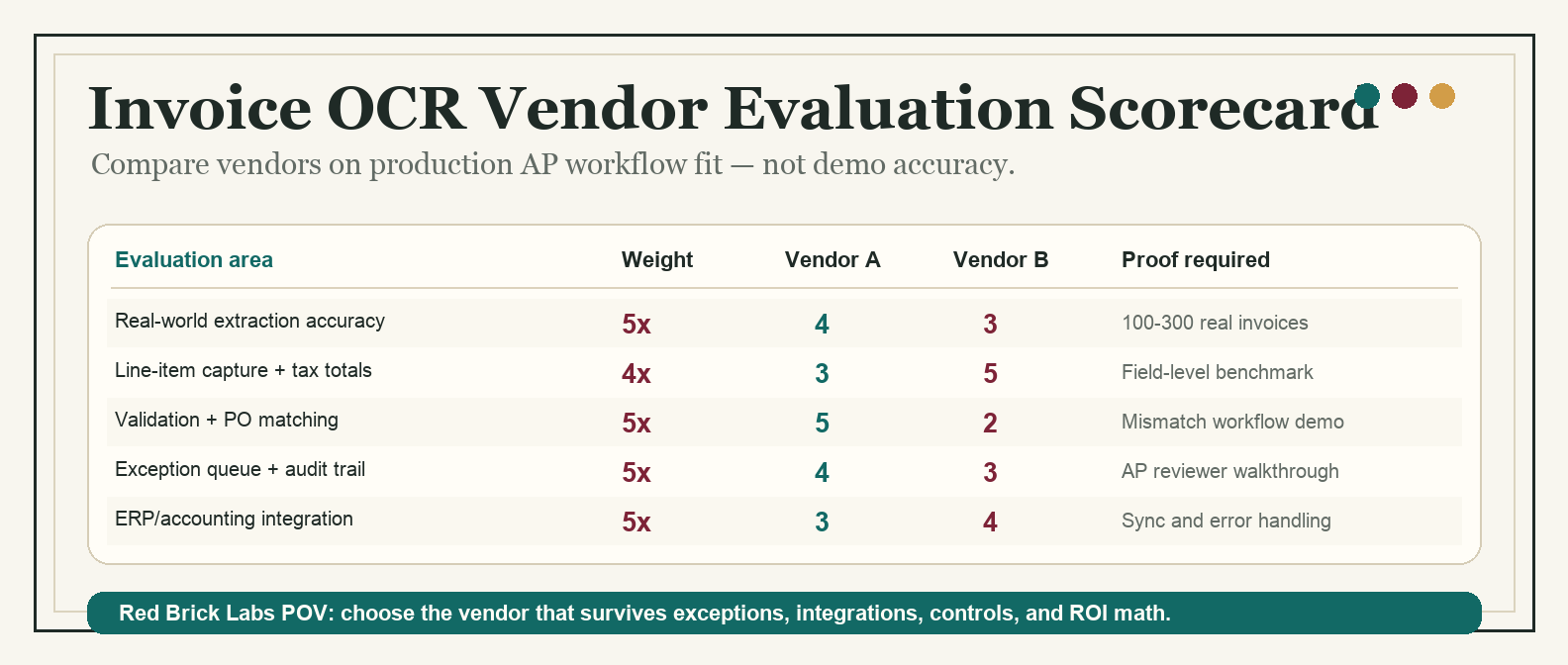
*Template preview: compare invoice OCR vendors by production workflow fit, not demo polish.*
Invoice OCR vendor evaluation scorecard
Score each vendor from 1 to 5 in every category, then multiply by the weight. A vendor can win the demo and still lose the scorecard if it cannot handle exceptions, controls, or integration.
| Evaluation area | Weight | Score 1 | Score 3 | Score 5 | Questions to ask |
|---|---|---|---|---|---|
| Real-world extraction accuracy | 5x | Works only on clean PDFs | Handles common invoice formats with review | Accurate on messy scans, native PDFs, multi-page invoices, and varied vendors | Can we test our own 100-300 invoices before signing? |
| Field-level confidence | 4x | One generic confidence score | Confidence for some fields | Field-level confidence, thresholds, and review triggers | Can low-confidence totals, tax, vendor, PO, and line items route differently? |
| Line-item capture | 4x | Header fields only | Basic line items with manual cleanup | Reliable tables, quantities, unit prices, tax, discounts, and descriptions | Does the vendor benchmark line items separately from header fields? |
| Format and language coverage | 3x | Requires heavy templates | Learns common layouts | Handles new supplier formats, scans, international invoices, and edge cases | What happens when a new vendor format appears? |
| Validation logic | 5x | Extracts text only | Basic totals and required-field checks | Configurable validation against totals, tax, vendor master, PO, GL, and policy rules | Which validations can finance configure without engineering? |
| PO and receipt matching | 4x | No matching | Basic PO match | Two-way or three-way matching with line-level exceptions | Can it match invoice, purchase order, and receipt data at the right granularity? |
| Duplicate and fraud controls | 4x | Manual checks | Simple duplicate warnings | Duplicate detection, vendor-bank-change flags, approval guardrails, and audit trails | How does it catch near-duplicate invoices or changed payment details? |
| Exception handling | 5x | Exceptions go to email or spreadsheets | Review queue exists | Prioritized queues, ownership, SLA tracking, comments, reprocessing, and audit history | What does an AP clerk actually see when OCR is uncertain? |
| Approval workflow fit | 3x | Fixed workflow | Configurable routing | Routing by entity, vendor, amount, department, PO status, project, and risk | Can it model our approval matrix without ugly workarounds? |
| ERP/accounting integration | 5x | CSV export only | Native connector or API for some systems | Reliable sync with your accounting stack, field mapping, error handling, and reconciliation | Is the integration read/write, real-time, batched, or manual export? |
| Security and compliance | 4x | Vague security page | Basic encryption and access control | SOC 2 or ISO 27001 posture, RBAC, SSO, audit logs, retention controls, and data residency options | Who can see invoice data, and where is it processed? |
| Implementation effort | 3x | Unclear timeline | Standard onboarding plan | Clear pilot plan, owner responsibilities, configuration effort, and go-live gates | What must our team do before value appears? |
| Pricing transparency | 3x | Opaque quote only | Usage pricing with caveats | Clear setup, platform, page, user, API, support, and overage costs | Are failed extractions, reprocessing, and test pages billed? |
| Reporting and ROI tracking | 3x | No baseline reporting | Basic volume dashboards | Tracks cycle time, straight-through processing, exception rate, manual touches, and cost per invoice | Can we prove the pilot saved time or reduced risk? |
| Ownership and maintainability | 3x | Vendor must change everything | Admins can adjust some rules | Finance and operations can maintain fields, rules, queues, and mappings with guardrails | Who owns the system after the implementation team leaves? |
Maximum score: 290 points. Convert to 100 by dividing by 2.9.
Score interpretation
| Score | Decision | What it means | Recommended next step |
|---|---|---|---|
| 85-100 | Strong pilot candidate | The vendor appears production-ready for your invoice workflow. | Run a controlled pilot with real invoices and success metrics. |
| 75-84 | Worth piloting if scoped | The core fit is strong, but one or two gaps need boundaries. | Narrow the pilot to the invoice types and systems where fit is strongest. |
| 65-74 | Risky without proof | The demo may work, but production risk is visible. | Ask for proof on weak categories before commercial negotiation. |
| 50-64 | Too much workflow risk | The vendor may extract data but is weak on AP workflow, controls, or integration. | Re-scope, compare a different category, or use it only for a narrow intake use case. |
| Below 50 | Do not buy | This is likely OCR plumbing, not a production AP automation fit. | Do not proceed unless the problem is only basic data capture. |
The score is not a procurement ritual. It is a way to stop the loudest demo from becoming a six-month cleanup project.
How to run the evaluation
1. Build a real invoice test set
Do not let vendors test only their sample documents. Create a representative packet of invoices from your current workflow.
Include:
- high-volume vendors;
- low-volume but high-value vendors;
- native PDFs and scanned PDFs;
- multi-page invoices;
- PO and non-PO invoices;
- invoices with line items, freight, tax, discounts, and credits;
- international formats if relevant;
- invoices that currently require manual judgment.
A practical pilot set is 100 to 300 invoices. That is enough to expose bad assumptions without turning evaluation into a research project.
2. Score accuracy by field, not by document
A vendor saying "98% accurate" is meaningless unless you know what was measured. Header-level vendor name accuracy is not the same as line-item tax accuracy. A tool can read the invoice number correctly and still create downstream chaos if totals, PO numbers, or vendor IDs are wrong.
Track at least these fields:
| Field | Why it matters | Review trigger |
|---|---|---|
| Vendor name and vendor ID | Matches invoice to the approved vendor record | New vendor, fuzzy match, bank-detail change |
| Invoice number | Prevents duplicate payment | Duplicate, near-duplicate, missing invoice number |
| Invoice date and due date | Drives payment timing and accruals | Missing date, stale invoice, unusual payment terms |
| PO number | Enables purchase order matching | Missing PO, invalid PO, PO belongs to wrong entity |
| Line items | Supports coding, matching, and cost review | Quantity, unit price, tax, or description mismatch |
| Subtotal, tax, and total | Controls payment and accounting entry | Calculated total does not match extracted total |
| Currency and entity | Prevents accounting and payment errors | Currency mismatch, wrong subsidiary, missing entity |
| GL code or cost center | Supports accounting workflow | Low confidence, invalid code, policy exception |
This is where a lot of invoice OCR products get caught. They look good on clean header fields and get wobbly when line items, tax, or matching rules matter.
3. Test the exception workflow like it is the product
Invoice OCR is only valuable when humans can trust the review path. The exception queue is not a side feature. It is where production automation lives.
During vendor demos, ask the team to show:
- a low-confidence field routed to review;
- a duplicate invoice warning;
- a PO mismatch;
- a new vendor exception;
- a changed bank-detail flag;
- a tax or total mismatch;
- an approval rejection and rework path;
- the audit log for a corrected invoice.
If the exception flow ends in email, Slack, or a spreadsheet, be honest about what you are buying. That may be fine for a narrow pilot. It is not a controlled AP operating model.
4. Verify the integration, not the logo slide
ERP and accounting logos on a vendor site are not proof of integration fit. You need to know what data moves, when it moves, what happens when sync fails, and who fixes mapping issues.
Ask:
- Which objects can the vendor read and write: vendors, POs, receipts, invoices, bills, GL codes, departments, entities, approvals, payments?
- Is the integration native, API-based, file-based, RPA-based, or partner-built?
- Does it support your specific ERP/accounting configuration?
- Can it handle multi-entity, multi-currency, and tax rules?
- What error messages appear when sync fails?
- Can rejected or corrected invoices sync cleanly?
- Who owns field mapping after launch?
For finance teams comparing broader AP options, the category breakdown in accounts payable OCR software will help separate AP suites, IDP platforms, cloud OCR APIs, and lightweight extraction tools.
5. Separate document automation from workflow automation
Some vendors are excellent at extraction. Some are excellent at AP workflow. Some are APIs that need a custom operating layer. Some are suites that want to own the whole process.
None of those categories is automatically better. The wrong category is what hurts.
| Vendor category | Strongest when | Weakest when |
|---|---|---|
| AP automation suite | Finance wants intake, approvals, payment workflow, and controls in one tool | Workflow rules or integrations are too unusual for the suite |
| Intelligent document processing platform | Document variability is high and extraction/review needs are complex | Finance expects a finished AP workflow without configuration work |
| Cloud OCR/document AI API | Technical team needs a custom workflow around existing systems | Finance expects a ready-to-use AP application |
| Lightweight extraction tool | Team wants a fast proof of concept or simple invoice-to-spreadsheet workflow | Controls, auditability, and exception routing are production requirements |
| RPA/workflow platform | Enterprise already has automation infrastructure and governance | The AP process is messy and automation will just move the mess faster |
The Red Brick Labs POV: buy a vendor only after you know which part of the workflow you want the vendor to own. If you cannot answer that, you are not evaluating vendors yet. You are shopping anxiety.
Red Brick Labs scorecard worksheet
Use this lightweight worksheet during procurement calls and pilot reviews.
| Step | What to capture | Owner | Output |
|---|---|---|---|
| Workflow baseline | Invoice volume, manual touches, cycle time, cost per invoice, exception rate | Finance owner | Current-state baseline |
| Vendor shortlist | 3-5 vendors by category, not just brand awareness | Finance + ops | Comparable shortlist |
| Test packet | 100-300 real invoices with known expected values | AP lead | Pilot data set |
| Scorecard review | Weighted scoring across the 15 categories above | Finance, ops, IT/security | Vendor score out of 100 |
| Integration proof | Field map, sync path, error handling, and owner model | Technical owner | Integration risk assessment |
| Control review | Approval rules, audit logs, permissions, duplicate detection | Finance + security | Control checklist |
| Pilot decision | Scope, success metrics, timeline, go/no-go gate | Executive sponsor | Controlled pilot plan |
Pilot success metrics
Before signing a full contract, define what success looks like. Use metrics that expose workflow outcomes, not vanity extraction claims.
| Metric | Why it matters | Good pilot target |
|---|---|---|
| Field-level accuracy | Shows whether critical AP data is reliable | Critical fields meet agreed threshold by field type |
| Straight-through processing rate | Measures invoices processed without human correction | Improves over baseline without hiding exceptions |
| Exception rate | Shows how much work remains for humans | Exceptions are categorized and actionable |
| Manual touches per invoice | Connects automation to labor savings | Clear reduction in opening, keying, checking, and routing |
| Cycle time | Measures speed from receipt to approved invoice | Faster approval without weaker controls |
| Cost per invoice | Connects vendor cost to ROI | Lower fully loaded cost after software and support |
| Duplicate/payment-risk catches | Measures control value | Duplicates and vendor-risk exceptions are visible before payment |
| ERP sync error rate | Tests production readiness | Low, explainable, and recoverable errors |
If a vendor cannot help you measure these, they are asking you to buy faith. Finance has better hobbies.
CTA: get the scorecard before the demo sprint
Red Brick Labs helps finance and operations teams evaluate invoice OCR vendors the practical way: map the workflow, build the invoice test packet, define scoring weights, pressure-test integrations, and run a controlled pilot before anyone gets seduced by a polished demo.
If you want the working version of this scorecard, book a 15-minute consultation and we will help adapt it to your invoice volume, ERP stack, approval rules, and risk profile.
Get the invoice OCR vendor scorecard: Red Brick Labs can help your team turn this scorecard into a vendor pilot, test real invoices, pressure-test integrations, and choose the invoice OCR workflow that will actually survive production.
Source notes
Current invoice OCR and AP automation guidance consistently points to the same evaluation areas: field-level extraction accuracy, invoice format variability, line-item capture, validation, PO matching, ERP integration, exception handling, security, implementation effort, pricing transparency, and measurable ROI.
Sources reviewed for this article:
- Invoice Scanning Software: A Complete Buyer's Guide — useful framing around extraction accuracy, format support, deployment model, pricing transparency, security, and ROI baselines.
- Comparing the best invoice scanning software in 2026 — highlights AP workflow criteria including extraction, validation, PO matching, ERP integration, exception handling, controls, implementation, and ROI.
- Invoice OCR Buyer's Guide: How to Evaluate Features, Security, and Pricing — emphasizes template-free extraction, handling new vendor formats, pricing predictability, and SOC 2/ISO 27001 considerations.
- Best OCR Software for Invoice Processing — useful notes on line-item extraction, three-way matching, AP-focused exception queues, ERP integrations, governance, and time-to-value.
- Best OCR Software for Invoice Processing: Comparative Meta-Analysis — documentation-based comparison across OCR vendors, with criteria around intake, extraction, validation, export/integration, deployment, pricing, and ROI.