Manual invoice entry usually survives because it is familiar, not because it is efficient. Finance teams know the pain: PDFs arrive from every direction, vendor formats keep changing, approval rules live in people's heads, and the accounting system only sees clean data after someone has done the boring work by hand.
Short answer
Invoice OCR implementation works when finance treats it as an accounts payable workflow project, not a document-scanning project. The goal is not to read text from invoices. The goal is to capture the right fields, validate them against business rules, route exceptions to humans, and sync approved invoice data into the accounting stack without creating a control problem.
A good pilot starts with a representative invoice sample, clear success metrics, and a narrow workflow. It should prove that OCR can reduce manual touches while keeping finance in control of approvals, vendor records, coding, and payment timing.
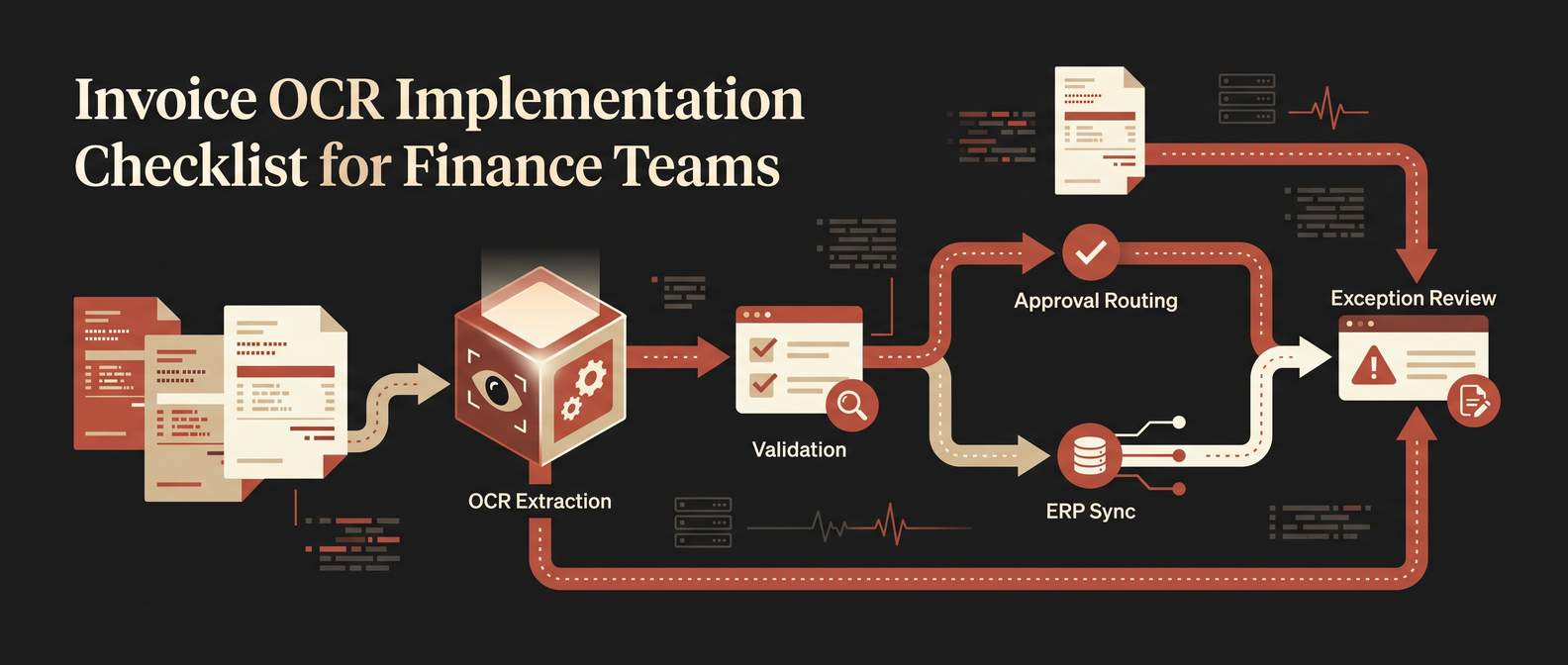
*Production invoice OCR should extract, validate, route, sync, and escalate exceptions — not just read text from PDFs.*
1. Define the manual work being replaced
Start by writing down the work AP clerks, controllers, or operations staff actually do today. Do not begin with a vendor demo. Begin with the workflow.
Map each step:
- Where invoices arrive: email inboxes, portals, shared drives, procurement systems, or physical scans.
- Who opens and sorts them.
- Which fields are keyed manually.
- Which fields are checked against purchase orders, vendor records, contracts, or receipts.
- Which exceptions require human judgment.
- Where the approved invoice goes next.
- Who owns final payment approval.
This is where many invoice OCR projects go soft. They say "automate AP" when the actual bottleneck is more specific: extracting line items from messy PDFs, matching invoices to purchase orders, routing approvals by department, or catching vendor-bank-detail changes before payment.
For tool selection context, see our guide to the best OCR software for invoice processing. For the broader workflow, read how to automate invoice processing.
2. Build a representative invoice sample
Your pilot sample should look like the invoices your team actually receives, not the clean five-page demo set that makes every OCR vendor look like a magician.
Include:
- High-volume vendors.
- Low-volume but high-value vendors.
- Scanned PDFs and native PDFs.
- Multi-page invoices.
- Invoices with purchase orders and without purchase orders.
- Line-item-heavy invoices.
- Credit memos.
- International tax formats if relevant.
- Edge cases that currently slow the team down.
A useful starting sample is 100 to 300 invoices. That is large enough to expose format variability and small enough to review manually during the pilot.
3. Decide which fields matter
Invoice OCR can extract a lot of text. Finance only needs the data required to make a controlled payment decision.
Prioritize fields by operational value:
| Field | Why it matters | Human review trigger |
|---|---|---|
| Vendor name and ID | Matches invoice to approved vendor master | New vendor, fuzzy match, changed bank details |
| Invoice number | Prevents duplicate payment | Duplicate or near-duplicate invoice number |
| Invoice date and due date | Drives payment timing and accruals | Missing, stale, or unusual terms |
| Purchase order number | Enables PO matching | PO missing or mismatch |
| Subtotal, tax, total | Validates accounting entry | Amount mismatch or tax anomaly |
| Line items | Supports coding, allocation, and approval | Unknown SKU, unusual quantity, price variance |
| Currency | Prevents payment and reporting errors | Unexpected currency or conversion issue |
| Department or cost centre | Routes approval and coding | Missing or inferred with low confidence |
The practical rule: automate confident extraction, not wishful extraction. Low-confidence fields should go to review instead of silently polluting the accounting system.
4. Choose the integration path before choosing the model
The OCR model is only one component. The harder question is where the extracted data goes.
Most finance teams need integration with at least one of these systems:
- Accounting software.
- ERP.
- Procurement or purchase order system.
- Vendor master.
- Approval workflow tool.
- Document storage.
- BI or audit reporting layer.
If your stack is already stable, do not replace it just to get OCR. Build around it. A production invoice OCR system should sit upstream of the accounting platform, clean and validate invoice data, then push approved records into the existing system of record.
That is the same pattern we use in document processing automation: capture, structure, validate, route, then integrate.
5. Set human-in-the-loop rules
Finance automation fails when it pretends every invoice is safe to process automatically. The better design is explicit exception handling.
Create rules for when humans stay in the loop:
- OCR confidence below a threshold for critical fields.
- Vendor not found in approved vendor master.
- Bank details changed.
- Invoice amount exceeds approval limit.
- PO, receipt, and invoice do not match.
- Duplicate invoice number or suspicious near-duplicate.
- Tax treatment is unclear.
- Currency or legal entity is unexpected.
- Department or GL code cannot be assigned confidently.
The point is not to remove finance from the process. The point is to stop making finance review the boring invoices and focus attention on the risky ones.
6. Measure the pilot with finance metrics
Do not measure an invoice OCR pilot only by extraction accuracy. Accuracy matters, but finance leaders care about the operating outcome.
Track:
- Percentage of invoices processed without manual data entry.
- Field-level extraction accuracy for vendor, invoice number, amount, due date, PO, and line items.
- Exception rate by vendor and invoice type.
- Average cycle time from receipt to approved entry.
- Cost per invoice.
- Duplicate payment risk caught.
- Number of manual touches per invoice.
- Rework caused by bad extraction or weak validation.
A pilot should produce a simple before-and-after view: how much manual work disappeared, what still needs review, and what must improve before scaling.
7. Roll out in controlled phases
Start narrow. A good first phase might cover one business unit, one invoice inbox, or the top 20 vendors by volume.
A practical rollout looks like this:
- Discovery: Map the current AP workflow and invoice types.
- Data readiness: Collect representative invoices and approved reference data.
- Extraction pilot: Test OCR and field extraction on real samples.
- Validation layer: Add vendor, PO, amount, duplicate, and approval checks.
- Human review queue: Route exceptions with reason codes.
- System integration: Sync approved invoice records into the accounting stack.
- Measurement: Compare cycle time, cost, exception rate, and manual touches.
- Scale-up: Add more vendors, entities, formats, and approval paths.
This phased approach protects finance controls while still moving quickly.
Red Brick Labs POV
The first version should not try to automate every invoice. That is how teams end up with a brittle demo and a nervous controller.
We would start with a high-volume, medium-complexity slice of AP where the data is available, the approvals are clear, and the accounting integration path is known. Then we would ship a pilot that extracts invoice fields, validates them against real business rules, routes exceptions to humans, and measures the reduction in manual touches.
The win is not OCR. The win is a finance workflow where clean invoices move without drama and messy invoices get surfaced before they become payment problems.
Map your invoice OCR pilot: If your AP team is still keying invoices by hand, Red Brick Labs can map the workflow, model the ROI, and ship a controlled invoice OCR pilot that plugs into your existing accounting stack.
Invoice OCR implementation checklist
Use this as the working checklist before starting the pilot:
- Current invoice intake channels documented.
- Representative invoice sample collected.
- Critical fields defined by finance, not by the OCR tool.
- Vendor master and PO data available for validation.
- Exception rules agreed with finance leadership.
- Human review queue designed before go-live.
- Accounting or ERP integration path confirmed.
- Success metrics baseline captured.
- Security and access rules reviewed.
- Pilot scope limited to a workflow that can ship in weeks.
FAQ
What is the first step in an invoice OCR implementation?
Start by mapping the current accounts payable workflow and collecting a representative sample of real invoices. Tool selection should come after you understand the workflow, exception rules, and integration path.
Does invoice OCR replace accounts payable software?
Usually no. Invoice OCR should extract, structure, and validate invoice data before syncing approved records into the accounting, ERP, or AP system finance already uses.
How accurate does invoice OCR need to be?
It depends on the field. Invoice totals, vendor IDs, invoice numbers, and bank details need very high confidence or human review. Less critical metadata can tolerate lower confidence if it does not create payment or reporting risk.
What makes invoice OCR fail in production?
Most failures come from weak validation, poor exception handling, bad samples, and unclear integration ownership. The model may read the invoice correctly, but the workflow still breaks if nobody decides what happens when a PO does not match.