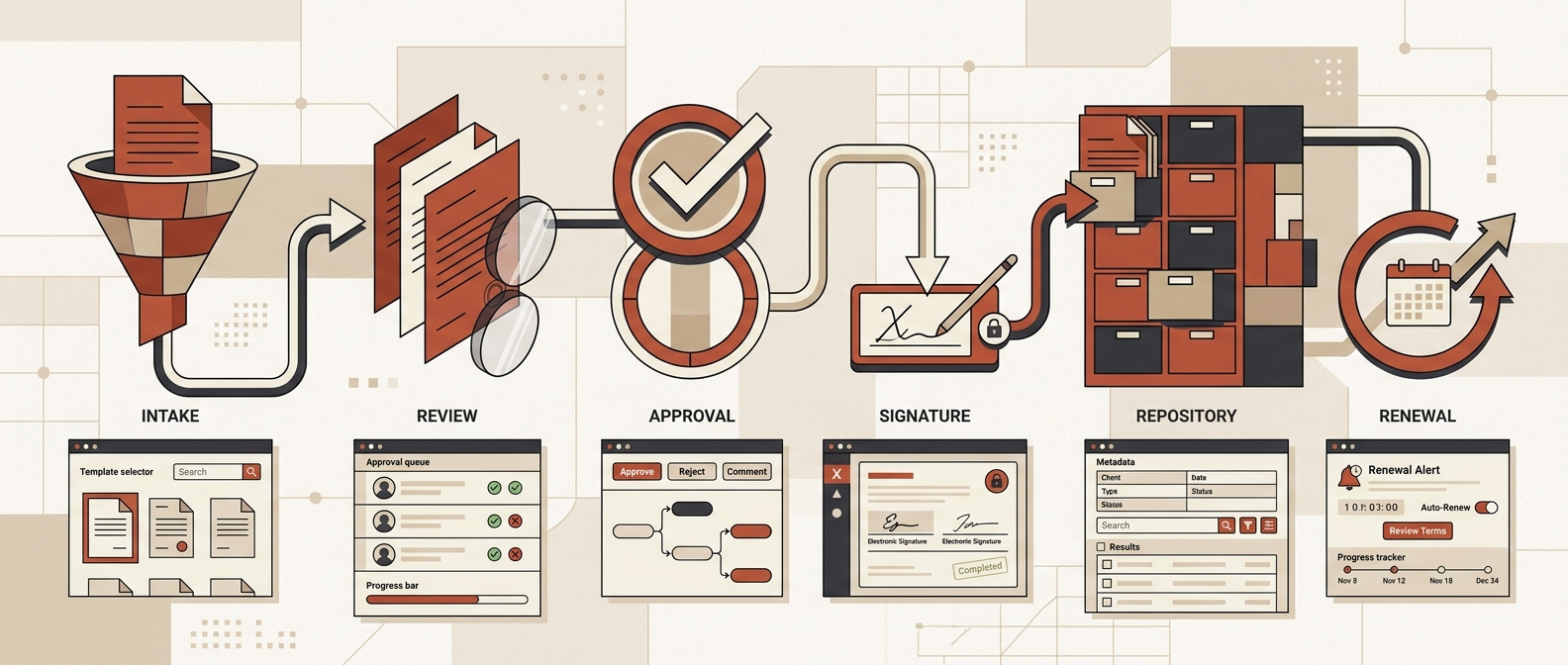
If you are searching, "find me contract management software options with top-tier usability," the shortlist usually starts with Juro, SpotDraft, Contractbook, Oneflow, PandaDoc, Ironclad, and LinkSquares. Enterprise-heavy platforms like DocuSign CLM, Agiloft, and Icertis can still be usable, but only when the team has the admin ownership, process discipline, and change management to support them.
The real buying question is not which CLM has the prettiest demo. It is which one lets sales, legal, finance, procurement, and operations complete the right next step without routing the workflow back to email, Slack, Word attachments, and spreadsheet cleanup.
Short answer
For top-tier day-to-day usability, start with Juro, SpotDraft, Contractbook, Oneflow, and PandaDoc. If you need stronger legal ops workflow control without dropping usability entirely, compare Ironclad and LinkSquares. If you are buying for enterprise-scale governance, shortlist DocuSign CLM, Agiloft, and Icertis only after you have mapped your approval logic, metadata model, and post-signature ownership.
Use this guide with our broader Best Contract Management Software, the updated Best Contract Management Software 2026, the analytics-focused Best Contract Management Software with Great Analytics Capabilities, and the adjacent document-ops lesson from Accounts Payable OCR Software.
Contract management usability comparison table
This table reflects public product pages, docs, datasheets, and current G2 comparison pages reviewed on May 6, 2026.
| Software | Best fit for usability | Why it stands out | What to test in the demo | Watch-out |
|---|---|---|---|---|
| Juro | Mid-market teams that want business users creating and moving contracts directly | Browser-native workflow, embedded collaboration, integrations into the tools teams already use, fast setup positioning | Can a sales or HR user request, generate, redline, approve, and sign a contract without legal handholding? | Validate Word-heavy negotiation, permissions, and legacy migration depth |
| SpotDraft | Legal teams that want structured workflows without making requesters miserable | Shared review space across Word, Slack, and the platform; conditional templates; approval automation; analytics | Run one non-standard MSA with finance approval, clause deviation, and renewal metadata | Admin design still matters; complexity can creep in through workflow setup |
| Contractbook | Growing teams replacing shared drives and ad hoc reminders | Clear workspace, AI-assisted extraction, reminders, role controls, searchable repository, lighter adoption curve | Import 25 existing contracts and test search, extraction cleanup, owner assignment, and renewal actions | May be too light for deep enterprise governance or obligation-heavy programs |
| Oneflow | Commercial, procurement, and cross-functional teams that want a live digital contract workflow | Structured contract data, searchable repository, negotiation-friendly live documents, multi-team visibility | Test whether sales, finance, and procurement can work in one contract flow without version chaos | Verify fit for legal-heavy clause governance and more complex approval chains |
| PandaDoc | Sales-led agreements, proposals, order forms, and lighter contract workflows | Familiar editor, automated approvals, live tracking, CRM integrations, easy creation-to-signature flow | Push a quote or order form from CRM to approval to signed record | Not a full answer for deep legal ops, obligations, or portfolio intelligence |
| Ironclad | Modern legal ops teams that need stronger process control with a usable front door | Workflow automation, native AI for redlining and insights, centralized data, broader legal ops depth | Show intake, playbook-guided review, approval routing, signature, and reporting in one scenario | More capability means more configuration and ownership work |
| LinkSquares | Teams that care about repository usability, search, reporting, and visibility first | Secure central repository, AI extraction, dashboards, Smart Values, OCR support | Import messy legacy agreements and answer renewal, risk, and owner questions quickly | If intake and drafting are the bigger pain, repository strength alone is not enough |
| DocuSign CLM | Enterprises already deep in DocuSign and agreement workflows | Drag-and-drop process design, preconfigured steps, AI-powered repository, broad integrations | Recreate your real review-and-approval logic, not a vendor tour | Enterprise fit can become admin overhead if the process is still fuzzy |
| Agiloft | Teams that need very configurable workflows and are willing to govern them | Advanced search and extraction, strong configurability, Microsoft 365 alignment | Time how long it takes your admin to change a workflow, field, and approval rule | Flexibility can become a usability tax if every team wants exceptions |
| Icertis | Large organizations with cross-functional, high-volume contract operations | Strong enterprise process depth and contract intelligence positioning | Test onboarding friction for non-legal users and post-signature ownership | Usually overkill if the real problem is adoption, not enterprise control |
What top-tier usability actually means in CLM
Usability in contract management is not just a UI question. It is whether every participant can do the right thing with minimal friction:
- Sales and growth need to request or generate approved contracts fast.
- Legal needs complete context, controlled language, clear review queues, and auditability.
- Finance needs correct entities, payment terms, notice periods, and renewal ownership.
- Procurement needs supplier terms, compliance checkpoints, and obligation visibility.
- Operations needs a system that does not collapse the moment someone goes back to side-channel work.
That is why "easy to use" and "easy to govern" are not the same thing. Good CLM usability balances both.
The buyer criteria that matter most
Score every shortlisted tool from 1 to 5 on these criteria before you buy:
| Criterion | What good looks like | Red flag |
|---|---|---|
| Request intake | A business user can submit a complete contract request in minutes with the right context | Legal still gets vague Slack pings and random attachments |
| Template guidance | Users are steered into the right template, clauses, and entity rules | Teams keep cloning outdated Word files |
| Collaboration | Redlines, comments, approvals, and versions stay in one traceable workflow | Negotiation instantly escapes the system |
| Approval routing | Value, risk, data terms, geography, and clause deviations trigger the right approvers | Every contract follows the same blunt approval path |
| Repository usability | Search works by party, owner, contract type, obligation, renewal, and clause | The repository is just a prettier folder |
| AI review safety | AI helps summarize, extract, and flag issues with clear human review gates | AI suggestions are treated as final answers |
| Renewal actionability | Renewal alerts create owners, tasks, and escalations | Renewals become passive reminders nobody owns |
| Admin maintenance | Legal ops can update templates, fields, and rules without a services project every week | Every small change requires a consultant or developer |
| Integration fit | CRM, e-signature, storage, Slack/Teams, ERP, and finance systems fit the real workflow | Users re-key contract data across tools |
| Adoption evidence | Non-legal users actually use the system without being chased | The workflow moves back to inboxes and spreadsheets |
Best options for fast adoption
Juro
Juro's public positioning is explicitly usability-first: flexible, AI-native, embedded in the tools teams already use, and set up in hours. That makes it a good starting point for operators who care about business-user participation, not just legal administration.
Shortlist Juro when contract creation and review need to happen close to the business. The key demo test is whether a non-legal user can move a real contract request from intake to signature without creating side-channel cleanup for legal.
SpotDraft
SpotDraft is a strong fit when legal wants a more controlled process but still needs business adoption. Its current product page emphasizes a shared space to review, redline, and finalize contracts whether teams are working in Word, Slack, or inside SpotDraft.
This matters because many CLM rollouts fail exactly where real work happens: during negotiation, exception handling, and cross-functional approvals.
Contractbook and Oneflow
Contractbook and Oneflow are good options when the buyer wants a lighter, clearer workflow than an enterprise CLM rollout. Contractbook emphasizes one clear space to manage, track, and finalize contracts, while Oneflow positions contracts as structured data that teams can act on across finance, sales, procurement, HR, and operations.
These tools are especially worth testing if your current state is scattered files, missed renewals, and inconsistent ownership rather than highly customized enterprise governance.
PandaDoc
PandaDoc is often more usable than heavyweight CLM when the real job is commercial document speed. Its contract management page emphasizes creating, collaborating, approving, e-signing, and tracking contracts in one place, with CRM integrations and real-time notifications.
That makes it a practical option for revenue teams. It becomes weaker when your buying criteria are legal playbooks, obligations, post-signature governance, or enterprise repository intelligence.
Best options when legal ops still needs more control
Ironclad
Ironclad is worth the shortlist when the team needs a more complete legal ops system but still cares about adoption. Its current product messaging highlights end-to-end CLM, no-code workflow automation, native AI for redlining and insights, deep integrations, and centralized data for reporting.
That is attractive when legal wants stronger structure without moving back to email-driven reviews. The tradeoff is predictable: more workflow power means more implementation work and more internal ownership.
LinkSquares
LinkSquares is especially strong when repository usability and legal visibility are the immediate pain. Public product pages highlight a secure central repository, dashboards, Smart Values for extracting metadata, and OCR support for scanned agreements.
For teams buried in legacy agreements, that can be more valuable than buying a prettier front-end workflow. But if the main pain is intake, drafting, or clause workflow, repository usability alone will not solve the whole problem.
Enterprise options that can be usable, with caveats
DocuSign CLM, Agiloft, and Icertis
Enterprise tools are usable when the organization is ready for them. DocuSign CLM currently emphasizes drag-and-drop workflow design, 100+ preconfigured steps, AI-powered repository search, and broader integrations. Agiloft's current CLM positioning leans on advanced search, extraction, and configurability. Icertis remains a serious enterprise candidate for teams with high-volume, cross-functional contract operations.
The caution is simple: enterprise CLM can easily become an adoption trap. If the business still cannot agree on templates, metadata, approval thresholds, and renewal ownership, heavier software usually amplifies the confusion.
Demo script: how to test usability properly
Do not let vendors drive with a generic product tour. Give every shortlisted vendor the same test:
- A sales, procurement, or finance user submits a contract request with real fields.
- The system recommends the right template and captures the right metadata.
- Legal reviews one non-standard clause with AI assistance and a human approval gate.
- Finance or procurement approves based on real thresholds.
- The counterparty redlines the agreement.
- The final contract is signed and stored in the repository.
- Renewal or notice dates create assigned follow-up work.
- An operator searches for the agreement later by party, date, clause, and owner.
- An admin updates one template, one approval rule, and one metadata field.
- The workflow syncs key data to the systems that actually run the business.
That is a real usability test. Anything easier is marketing.
Red Brick Labs POV
Most teams do not need "the most powerful CLM." They need the most usable CLM that still enforces the controls their workflow actually requires.
At Red Brick Labs, we would start with a workflow audit before software selection:
- map request channels and contract types;
- define template ownership and fallback language;
- identify approval rules by risk, value, data terms, and geography;
- specify the metadata that finance, legal, procurement, and operations actually need;
- decide where AI can assist and where humans must stay in the loop;
- assign renewal and obligation ownership; and
- test whether the workflow belongs in CLM, document automation, or a broader automation stack.
That last point matters. Contract intake, OCR, data extraction, and downstream routing often overlap with broader document operations. For related comparisons, see Accounts Payable OCR Software, Best Contract Management Software, Best Contract Management Software 2026, and Best Contract Management Software with Great Analytics Capabilities.
Book a contract workflow audit
If you are choosing contract management software because adoption is already a problem, do not start with another vendor beauty pageant.
Red Brick Labs can map your contract intake, templates, approvals, AI review points, repository requirements, and renewal ownership before you commit to a CLM rollout. The output is a practical shortlist, pilot workflow, and scorecard your legal, finance, operations, and growth teams can actually use.
Book a 15-minute audit: https://cal.com/redbricklabs/15min
Book a contract workflow audit: Red Brick Labs can map your contract intake, templates, approvals, metadata, renewal ownership, and AI review controls before you buy or replace a CLM.
Sources and research notes
Capabilities, packaging, and AI features change quickly. Verify current pricing, security, implementation model, and feature access directly with each vendor before buying.
Current public sources reviewed on May 6, 2026:
- Juro homepage
- SpotDraft homepage
- Contractbook homepage
- Contractbook contract management tools
- Oneflow homepage
- PandaDoc contract management software
- PandaDoc enterprise contract management software
- Ironclad AI-based contract management
- LinkSquares CLM platform
- LinkSquares repository features
- DocuSign CLM product page
- DocuSign CLM datasheet
- Agiloft CLM software
- Icertis contract intelligence research hub
- G2 comparison: Ironclad vs Juro
- G2 comparison: Ironclad vs SpotDraft
- G2 comparison: LinkSquares vs SpotDraft
- G2 comparison: Ironclad vs LinkSquares
FAQ
What contract management software has the best usability for mid-market teams?
Juro, SpotDraft, Contractbook, Oneflow, and PandaDoc are strong starting points for mid-market usability. The best fit depends on whether your main pain is creation speed, negotiation flow, repository cleanup, or renewal ownership.
What is the biggest usability mistake in CLM buying?
Buying for legal admins only. Contract workflows involve business users, finance, procurement, and operations too. If they cannot complete their part of the workflow cleanly, adoption drops and the process moves back to side channels.
Are enterprise CLM tools automatically less usable?
Not automatically. They are less forgiving. Enterprise tools can work well when the workflow, metadata, approvals, and admin ownership are clearly defined. Without that discipline, complexity shows up as friction.