If you want a short list of brands commonly linked with process mapping software, start with Microsoft Visio, Lucidchart, Miro, SmartDraw, diagrams.net, Creately, SAP Signavio, Nintex Process Manager, IBM Blueworks Live, and Bizagi.
That does not mean they belong in one undifferentiated bake-off. Some are best for collaborative diagramming. Some are better for BPMN-heavy modeling. Others are really process-governance systems that happen to include mapping. Buyers get into trouble when they compare them as if they solve the same problem.
Short answer
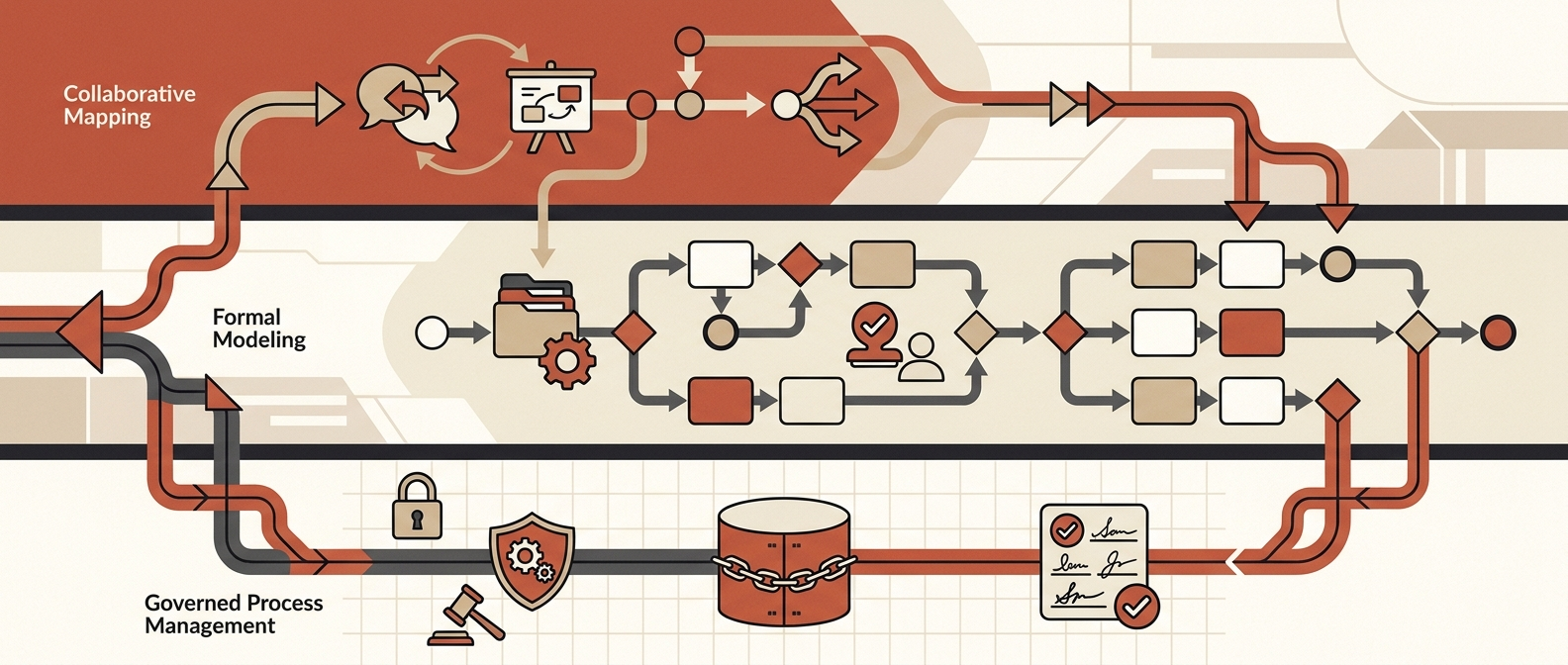
The brands most commonly linked with process mapping software fall into three buckets:
- Collaborative mapping tools: Lucidchart, Miro, SmartDraw, diagrams.net, and Creately.
- Formal modeling tools: Microsoft Visio and Bizagi.
- Governed process platforms: SAP Signavio, Nintex Process Manager, and IBM Blueworks Live.
For most mid-market teams, the shortlist should start with the category, not the logo. If your immediate goal is workshop speed, start with Lucidchart or Miro. If you need BPMN and simulation depth, compare Visio and Bizagi. If you need a shared process repository, ownership, controls, and a bridge into transformation or automation, move SAP Signavio, Nintex Process Manager, and IBM Blueworks Live to the top.
This article pairs well with AI Agent Frameworks, AI Agent Workflows, AI Automation for Business, and the AI Automation Readiness Scorecard for Mid-Market Teams.
Comparison table: brands commonly linked with process mapping software
| Brand | Category | Best fit | What to verify in a demo | Watch out for |
|---|---|---|---|---|
| Microsoft Visio | Formal modeling | Microsoft-centric teams and analysts | BPMN support, cross-functional flowcharts, template coverage, export needs | Web-first collaboration feels weaker than browser-native tools |
| Lucidchart | Collaborative mapping | Cross-functional teams that need fast co-authoring | Real-time collaboration, comments, integrations, data linking, template quality | Easy to become a generic diagram sprawl without standards |
| Miro | Collaborative mapping | Workshop-heavy teams and distributed operators | Diagramming mode, BPMN/value-stream shapes, import paths, collaboration controls | Great for discovery, weaker as a disciplined long-term process system of record |
| SmartDraw | Collaborative mapping | Teams that want speed and auto-formatting | Auto-layout, template depth, export paths, Confluence/Jira fit | Less process-governance depth than BPM suites |
| diagrams.net | Collaborative mapping | Cost-sensitive, technical, or documentation-first teams | File storage options, import support, offline/security posture, Atlassian fit | Governance and business-user adoption usually require extra process discipline |
| Creately | Collaborative mapping | Teams that want visual collaboration plus lightweight process structure | Real-time collaboration, shape libraries, integrations, AI generation, template consistency | Validate whether it is enough for formal governance and review workflows |
| SAP Signavio | Governed process platform | Enterprise transformation and process architecture programs | Shared repository, dictionary, QuickModel, conventions, simulation, API options | Heavy for teams that just need mapping and alignment |
| Nintex Process Manager | Governed process platform | Mid-market and enterprise teams mapping processes to improve and automate them | Process hub, AI capture, BPMN modeling, dashboards, mobile access, ownership model | Requires active process ownership or the repository goes stale |
| IBM Blueworks Live | Governed process platform | Teams that want a managed, centralized process workspace | Repository model, collaboration controls, analysis tools, update workflows | More platform than some teams need for lightweight documentation |
| Bizagi | Formal modeling | BPMN-centric analysts and improvement teams | Modeling depth, simulation, import paths, publishing, process library options | Strong for analysts, not always the easiest entry point for broad business participation |
The buyer mistake that keeps repeating
Most teams are not actually buying "process mapping software." They are buying one of four outcomes:
- faster current-state discovery;
- better cross-functional alignment;
- a governed process repository; or
- cleaner inputs for automation, compliance, and change work.
If you do not decide which outcome matters most, the evaluation turns into feature tourism. That is how a team that needs a process hub buys a whiteboard, or a team that just needs workshop clarity buys a heavyweight transformation suite.
How to group the market before you compare vendors
1. Collaborative mapping tools
These tools are strongest when the job is to get people in a room, map the current state, and create something business users will actually update.
Brands most often linked here:
- Lucidchart
- Miro
- SmartDraw
- diagrams.net
- Creately
Official product pages still frame these tools around collaboration, templates, imports, and easy diagram creation. Lucidchart emphasizes real-time co-authoring and integrations. Miro leans into process mapping, BPMN/value stream shape packs, imports, and AI-assisted diagramming. SmartDraw emphasizes intelligent formatting and export paths. diagrams.net positions itself as a free online diagramming tool with broad storage and integration options. Creately combines collaborative diagramming with process-map templates and AI generation.
2. Formal modeling tools
These matter when your team needs notation discipline, simulation, or analyst-grade structure.
Brands most often linked here:
- Microsoft Visio
- Bizagi
Microsoft’s current support content still highlights BPMN 2.0 diagrams, audit diagrams, cross-functional flowcharts, and other method-specific templates in Visio. Bizagi continues to position Modeler around intuitive process mapping, BPMN, publishing, imports, and process simulation, with cloud repository and process library options in its broader documentation.
3. Governed process platforms
These are the right comparison set when the map needs to live beyond the workshop and become an operating asset.
Brands most often linked here:
- SAP Signavio
- Nintex Process Manager
- IBM Blueworks Live
Current public materials consistently emphasize repository depth, shared standards, collaboration, process ownership, and links to improvement or automation. SAP Signavio highlights a shared repository, shared dictionary, QuickModel, modeling conventions, and APIs. Nintex emphasizes AI Process Capture, AI Process Generator, a centralized process hub, dashboards, and BPMN modeling. IBM Blueworks Live positions itself as a cloud-based process management and modeling platform with a secure central repository and a single source of truth.
Practical evaluation criteria for operators implementing automation
Most process mapping evaluations are too visual and not operational enough. Use these criteria instead.
1. Can the map survive contact with the real workflow?
Test whether the tool can capture:
- exceptions;
- approvals;
- system handoffs;
- data inputs and outputs;
- role ownership; and
- the human review points that matter for risk.
If the tool only helps you draw a neat happy-path diagram, it is not enough for automation work.
2. Can business users participate without analyst babysitting?
This is where collaborative tools usually win early. If legal, finance, or operations leads cannot comfortably review and update the process, adoption dies fast.
3. Does the repository have a real governance model?
When comparing SAP Signavio, Nintex Process Manager, and IBM Blueworks Live, look closely at:
- version control;
- role-based access;
- shared dictionaries or reusable objects;
- review and approval flows;
- ownership assignment; and
- how stale processes get flagged.
4. Does formal notation help this workflow or just flatter the procurement team?
BPMN matters for some workflows. It does not matter for all of them. Use it when you need cross-team rigor, technical precision, or simulation. Do not optimize for it because it makes the demo feel more enterprise.
5. Does the tool connect to the systems around the process?
Look for import/export, documentation links, collaboration integrations, repository access, and any API or automation adjacency that helps maps become action.
For teams moving from documentation into execution, the question is not only "Can we map it?" It is "Can this map help us redesign, automate, train, and govern the workflow afterward?"
What Red Brick Labs would do first
We would not start by asking which vendor has the longest feature list. We would start by mapping one live workflow that has real cost, real handoffs, and real failure modes.
For most consideration-stage buyers, the right sequence is:
- Pick one workflow with measurable pain.
- Decide whether the immediate need is collaboration, formal modeling, or governance.
- Run the same workflow through two or three shortlisted tools.
- Measure how well each tool captures exceptions, ownership, and downstream automation requirements.
- Choose the lightest tool that can still support the operating model you actually need.
That is the Red Brick Labs point of view on process mapping software: buy for the workflow and operating model, not the canvas.
If your team is mapping processes because you know automation should happen next, we can help you audit the workflow, identify where documentation breaks down, and define the right stack before another tool turns into shelfware.
Book a 15-minute workflow audit
Book a workflow audit: Red Brick Labs can map your current-state process, identify where documentation stops being useful, and help you choose a process mapping stack that supports automation and adoption.
Recommended demo script for buyers
Use the same test in every product:
- Map a real cross-functional workflow, not a generic approval flow.
- Add one exception path, one escalation, and one compliance checkpoint.
- Assign process ownership and required reviewers.
- Link or reference the systems involved.
- Export or publish the output the way your team would actually use it.
- Ask a non-analyst stakeholder to review and suggest changes live.
- Check how the platform handles versioning and updates.
- Ask what this process map would look like six months later when the workflow changes.
The last step is where weak choices show themselves.
Sources and research notes
Capabilities and packaging change. Validate pricing, security, and enterprise controls directly with the vendor before purchase.
Primary sources used for this article:
- Microsoft Support: Process diagrams in Visio
- Lucidchart product page
- Miro process mapping
- SmartDraw process mapping software
- SAP Signavio Process Manager
- SAP Help: SAP Signavio Process Manager feature scope
- Nintex Process Manager
- Nintex Process Manager help documentation
- IBM Blueworks Live
- IBM Docs: Blueworks Live overview
- Bizagi Modeler
- Bizagi Modeler service overview
- Creately process mapping software
- draw.io integrations
- app.diagrams.net
Specific source notes used in the comparison:
- Microsoft currently documents BPMN 2.0 diagrams, audit diagrams, and cross-functional flowchart support in Visio.
- Lucidchart currently emphasizes real-time co-authoring, in-editor collaboration, data linking, and major workplace integrations.
- Miro currently highlights BPMN, value stream mapping, imports from Visio/Lucidchart/draw.io, and AI-assisted process mapping.
- SAP Signavio currently highlights collaborative cloud process modeling plus shared repository, shared dictionary, QuickModel, conventions, and APIs in its public product and help materials.
- Nintex currently positions Process Manager around AI capture, AI generation, centralized process hubs, dashboards, BPMN modeling, and compliance-friendly process management.
- IBM currently positions Blueworks Live around cloud-based process management and a secure central repository that acts as a single source of truth.
- Bizagi currently highlights intuitive mapping, BPMN, simulation, publishing, imports, and collaboration through its broader modeler documentation.
- Creately and diagrams.net remain credible shortlist options for teams prioritizing flexible collaborative mapping over heavyweight governance.
FAQ
What brands are most commonly linked with process mapping software?
The most common shortlist includes Microsoft Visio, Lucidchart, Miro, SmartDraw, diagrams.net, Creately, SAP Signavio, Nintex Process Manager, IBM Blueworks Live, and Bizagi.
Which process mapping brand is best for automation teams?
The best choice depends on what happens after the map is drawn. Collaborative tools are strongest for discovery. Formal modeling tools are stronger when notation and simulation matter. Governed process platforms are better when you need ownership, controls, and process assets that support improvement or automation over time.
Should we buy a whiteboard-style tool or a governed process platform?
Buy the whiteboard-style tool when the immediate problem is alignment and documentation speed. Buy the governed platform when the process map needs to become a maintained operating asset with review, versioning, ownership, and repository controls.